Use the Price Tracker with AI assistants
The tracker has a public, read-only MCP (Model Context Protocol) server. Any AI assistant that supports MCP can connect to it and answer questions about recorded prices in plain words, using the same data as this website and linking back to the product pages.
Steps last checked: 28 October 2026
The server address
https://
You do not need a Price Tracker account, a sign-in or a key. The server is public and read-only: it can look up prices, but it cannot change anything. It does not store your questions or what your assistant looks up, only anonymous daily usage counts (see the Privacy Notice).
ChatGPT
Open chatgpt.com in a web browser and log in. In a ChatGPT Business, Enterprise or Edu workspace, an admin may have to allow custom plugins before you can add one.
-
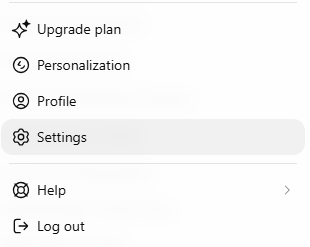
Select your profile name or picture, then select Settings.
-
Under Integrations, select Plugins.
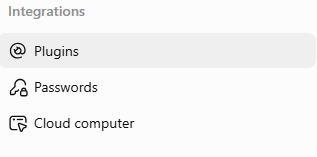
- Select Browse directory.
-
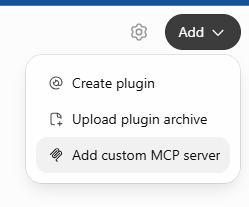
Select Add at the top right, then Add custom MCP server.
-
Fill in the form:
- Icon: leave it empty.
- Name:
SLU Price Tracker - Description: optional, for example
Saint Lucia grocery and fuel prices - Connection: keep Server URL selected and paste
https://mcp.slupricetracker.com /mcp - Authentication: change it from OAuth to No authentication.
- Read the warning about custom MCP servers, then tick I understand and want to continue.
-
Select Create as a plugin. The finished form looks like this:

-
ChatGPT shows Connect SLU Price Tracker, explaining what it may share with
the plugin. Select Connect SLU Price Tracker.
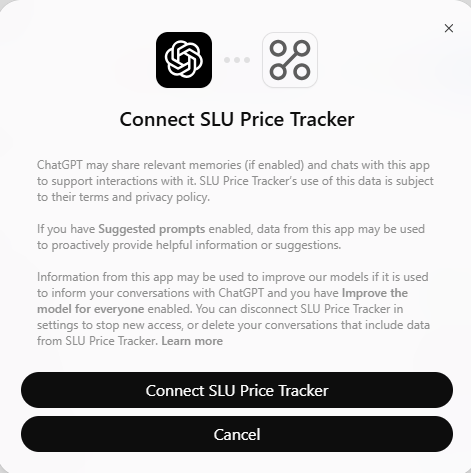
The tracker now appears in your installed plugins. ChatGPT may change these menu names over time. If a step does not match what you see, look for the option to add a custom MCP server in the plugins settings.
Ask questions
Start a new chat and ask about Saint Lucia prices. If the assistant answers from general knowledge, name the tracker in your question, for example "Using SLU Price Tracker, ...". In ChatGPT, open a new chat after adding the tracker.
- What is the cheapest long grain rice, and how has its price changed?
- Which products went up the most in price since the last update?
- Is there a cheaper alternative to this brand of cooking oil, compared per litre?
- What would 2 bags of rice, 1 pack of chicken and 3 tins of milk cost now?
- How have petrol, diesel and cooking gas prices changed this year?
- What changed in the latest price update for beverages?
What the answers mean
The assistant reads the same recorded prices that this website shows, so the same limits apply. Prices are recorded periodically, roughly monthly, from the public website of Massy Stores Saint Lucia. They are in East Caribbean dollars (EC$), may have changed since the capture date, and are not an official price index. Fuel and electricity prices come from ECCB tables. Always check the current price with the store before you buy. See the methodology for details.
An AI assistant can still make mistakes when it summarises the data. Each product in an answer links to its page on this website, where you can check the figures.
If it does not work in ChatGPT
- The Create as a plugin button stays grey. Fill in the name and server address, and tick I understand and want to continue.
- ChatGPT asks you to log in to the tracker. Authentication is still set to OAuth. Edit the plugin and choose No authentication.
-
ChatGPT cannot reach the server. Check that the address is exactly
https://, ending inmcp.slupricetracker.com /mcp /mcp, with no space before or after it. - There is no option to add a custom MCP server. Your plan or workspace may not allow custom plugins. In a work workspace, ask your admin.
Remove the tracker from ChatGPT
Open Settings, then Plugins, find SLU Price Tracker in your installed plugins and disconnect or remove it.
Other AI assistants
Step-by-step instructions for more assistants will be added here. In the meantime, any
assistant or app that supports MCP servers can connect: look in its settings for an option
to add a custom MCP server or connector, paste
https:// and choose no authentication if it asks.
The list of tools the server offers is on
mcp.slupricetracker.com.
Questions or problems: [email protected].